Why you need a push notification journey
9 min readPushFyre
A journey is a sequence that starts from a custom event, a segment, or a scheduled entry, then sends push and in-app messages with waits, a branch, and an exit. PushFyre runs that sequence and shows who entered, finished, or left.
Why do you need a journey?
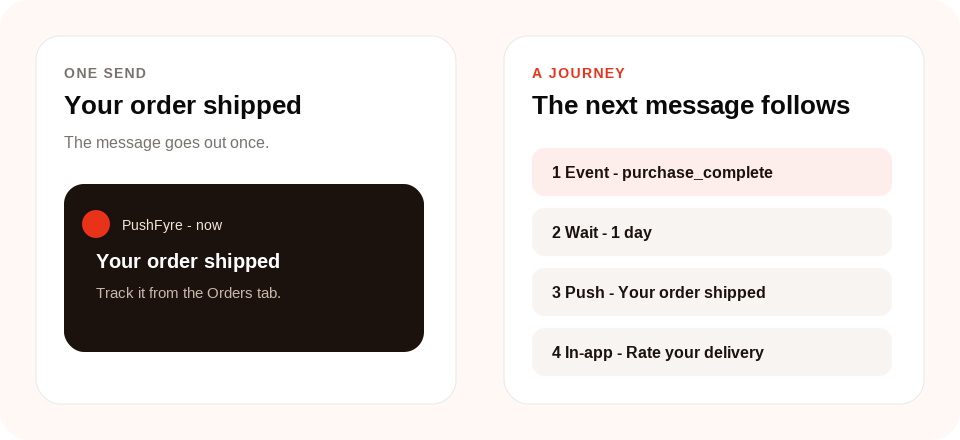
A purchase, a signup, or a first session rarely ends with one sentence. The person who just paid still needs the shipping update, and later a request to rate the delivery. A single push notification can say the first thing. The days between the messages, and the rule for who should get the next one, are a sequence.
That sequence is a journey. Your app or your server records the moment. PushFyre keeps the waits, the branch, and the exit, and sends the later steps to that same person. A team that would otherwise rebuild those timers in its own backend can publish the sequence once.
What benefits do you get?
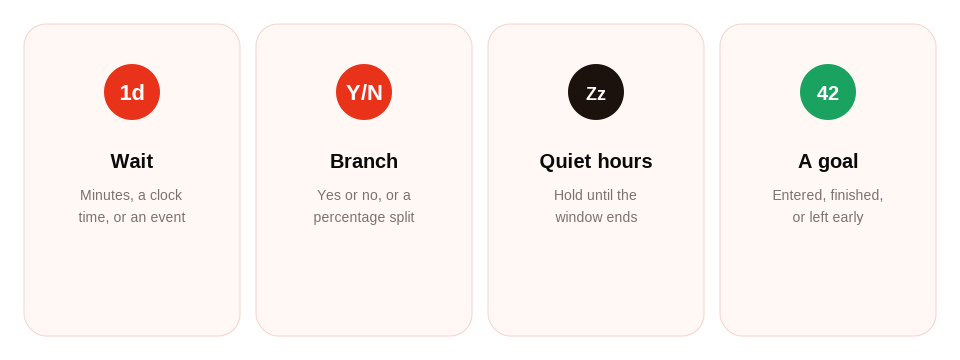
The benefit is a sequence you can see. Each step shows how many people entered it, completed it, and left it. A journey goal counts people who entered, completed, or left early. A push step can aim at sent, delivered, clicked, click rate, or failed. An in-app step can aim at impressed or clicked.
- The next message waits for minutes, for a clock time, or for an event, with a timeout.
- A yes/no branch continues one way or the other. A split sends a percentage down each path.
- Quiet hours hold a message that comes due inside the window until the window ends, on that person's clock or on UTC.
- The daily limit starts at 3 messages from this journey for that person. Set it to 0 for no daily cap. The maximum is 100.
- Pause freezes runs that are already in progress. Resume continues that same version. A step that fails is tried up to 3 times.
What does PushFyre offer in a journey?
Open Messages, then Journeys, and name it. A description can be up to 255 characters. The journey stays a draft until you publish. Publishing saves a version and starts that version. A journey has 1 to 30 steps. Up to 25 journeys can be live in one app.
A push step carries a title of up to 120 characters, a message of up to 500, and an optional link. Write them on the step, or copy them from a message template. An in-app step uses the same fields, written on the step or copied from an existing in-app message. The journey sends that copy for 7 days. A link is shown as an Open button. Later edits to the template or the original campaign leave the step as it was.
- Push notification, delivered to that person's Android, iOS, and web devices.
- In-app message, offered to that person's devices for 7 days.
- Wait, for minutes, until a clock time, or until an event.
- Yes/no branch, and a percentage split.
- Webhook, a POST to an https address with the journey id, run id, step id, device id, and external user id. The address cannot be localhost or a private network.
- Exit, which is also what happens at the end of a path.
How does someone enter?
There are three entries, and the entry type stays once the journey has gone live. Duplicate the journey when you want to start a different way.
- A custom event. The person enters when that event is recorded while the journey is live. Stored event names are lowercase.
- A segment, checked continuously. New matches are picked up about every minute.
- A segment, once. Everyone in the segment at the time you set enters together. Nobody is added afterwards.
How often can the same person enter?
You choose the re-entry rule. Only once means a single run. After they finish means a new run can start when the previous one has ended. Every time means a new run can start even while one is in progress.
An optional exit event takes the person out when that event is recorded. They also leave at an Exit step or at the end of a path. If the plan does not include journeys, the Journeys page explains that and does not let you publish. Plan details are on the pricing page.
When is a journey the right tool?
Use a journey when the second message depends on the first. An automated message is one saved push template, sent on the daily run or at a local time, to people who qualify. A push from your own backend is the call to make when your server already knows the exact moment and the exact words.
The setup, the step list, and the counts are written up in the journeys guide.
Do it in four steps
- Step 1
Name the journey
Open Messages, then Journeys. Give it a name. A description is optional.
- Step 2
Choose how it starts
Pick a custom event, a segment that is checked about every minute, or everyone in a segment at one time.
- Step 3
Add the messages
Write the push or in-app title and message, or copy them from a template or an existing in-app message. Add a wait, a branch, and an exit.
- Step 4
Publish
Publishing saves a version and starts it. The canvas shows who entered, completed, and left each step.
Questions
Does a journey replace a push campaign?
A push step is delivered to that person's push devices, the same way as a campaign. The title, message, and link live on the step. Choosing a template copies them in. Later edits to the template do not change the step.
Can the entry change after the journey is live?
The entry type stays after the journey has gone live. Duplicate the journey to start from a different event, segment, or time.
Does an in-app step use the in-app campaign?
Choosing a message copies its title, message, and link into the step. The journey sends that copy for 7 days. The campaign's audience, trigger, and format are not used. A link is shown as an Open button.
How is a journey different from an automated message?
A journey is a sequence of steps that starts from an event, a segment, or a set time. An automated message is one template on a repeating schedule.
Keep reading
- Send a push notification from your own backendYour order service can send an Android, iOS, and web push with one API call. No one has to open the portal for each message.
- Send an email notification from your own backendA receipt, a password reset, or a weekly note can leave your server through one email API call, from a domain you authenticate.
Put the next send on your server
Create the app, generate a server key, and call the same endpoint your backend already knows how to reach.